Guide for bidders
e-PADS 2.0: how to register, log in and bid
Checked against the official sources on 18 Nov 2026 · PakistanTenders.pk
What e-PADS is
e-PADS, the e-Pak Acquisition and Disposal System, is Pakistan's government e-procurement system. It is run by the federal Public Procurement Regulatory Authority (PPRA), and its pages say "Powered by Federal Public Procurement Regulatory Authority". Procuring agencies publish tenders on it, bidders download the documents and submit their bids on it, and the bids are opened and evaluated through it.
The current version, e-PADS v2.0, went live across the federal government on 15 February 2026. PPRA describes it as an end-to-end procurement and contract management platform built in-house, with automated supplier registration, beneficial-ownership checks, online bid submission and system-based evaluation, linked to FBR, NADRA, SECP and PEC.
For federal bodies it is compulsory: Rule 8 of the Public Procurement Rules, 2026 says procuring agencies "shall carry out public procurement through" e-PADS. Those rules apply to federal ministries, departments and the authorities and companies owned or controlled by the federal government.
The official addresses
Only addresses ending in .gov.pk are official. Sites at epads.pk or epads.com.pk are private guides like this one, not the portal.
| Address | What it is for |
|---|---|
| epads.gov.pk | Public list of open procurements, framework agreements, disposals and small purchases (up to Rs 700,000), with a jurisdiction selector. No login needed. |
| vendors.epads.gov.pk | The supplier portal of e-PADS v2.0: register, log in, download documents, submit bids. |
| pa.epads.gov.pk | Login for procuring agencies' staff; no self-registration. |
| eprocure.gov.pk | e-PADS version 1. A few agencies still point bidders there for tenders started on it. |
| epms.ppra.gov.pk | EPMS, PPRA's platform for publishing advertisements and evaluation reports. Not where bids are submitted. |
Which governments use it
The e-PADS home page asks you to choose a jurisdiction: Federal PPRA (the default), Sindh SPPRA, KPPRA, GBPPRA (Gilgit-Baltistan) and AJKPPRA (Azad Jammu and Kashmir). Punjab and Balochistan are not on it.
- Federal: e-PADS v2.0 since 15 February 2026; compulsory under the 2026 rules.
- Sindh: Sindh notices send bidders to SPPRA's e-PADS portal, printed as portalsindh.eprocure.gov.pk or sindh.eprocure.gov.pk.
- Khyber Pakhtunkhwa: KP notices send bidders to kp.eprocure.gov.pk.
- Punjab: its own Punjab e-Procurement System at ep.punjab.gov.pk, linked from PPRA Punjab's website. Some older notices name punjab.eprocure.gov.pk.
- Gilgit-Baltistan and AJK: PPRA signed agreements to extend e-PADS to them in January and April 2026.
- Balochistan: BPPRA runs its own electronic procurement system, where bidders register.
e-procurement tenders on this site
- Federal e-PADS tenders: 243 open of 443 printed notices
- Punjab e-Procurement tenders: 416 open of 693 printed notices
- Sindh e-PADS tenders: 137 open of 211 printed notices
- KP e-PADS tenders: 86 open of 124 printed notices
- All e-PADS and e-procurement tenders: 882 open
Newspaper notices that tell bidders to bid on each portal, counted live. The portals also carry tenders never printed in a newspaper.
Register as a vendor
- Open vendors.epads.gov.pk/register. PPRA's home page links it as "Register as Vendor!".
- Fill in the form headed "Vendor Registration on EPADS v2.0": title (Mr, Mrs, Ms, Prof, Dr or Engr), first, middle and last name, mobile number, e-mail address and a password, and tick the privacy policy and terms.
- Choose the e-mail address with care. The form says it is your unique identifier on e-PADS v2.0 and cannot be changed later. Use one the business will keep.
- Complete your business profile after signing in. The e-PADS terms ask suppliers in general for valid business registration and licences and tax registration and compliance certificates; PPRA publishes no fixed checklist of documents.
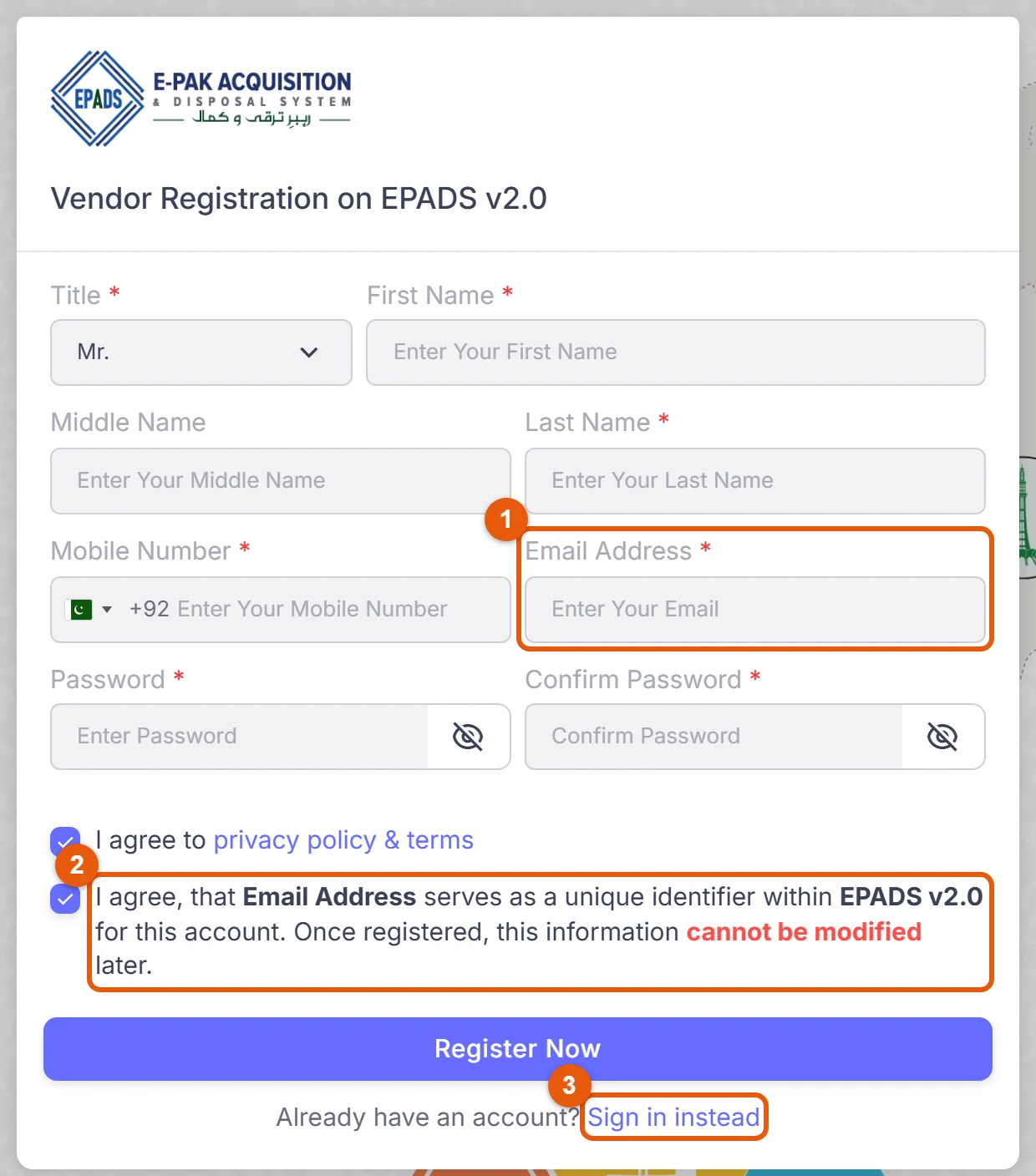
- Email Address: your identity on e-PADS v2.0.
- The form's own warning: once registered, the e-mail address cannot be modified.
- Already registered? Sign in instead goes to the vendor login.
Screenshot of vendors.epads.gov.pk/register, run by PPRA, taken 18 November 2026. Nothing was filled in. Numbered marks added by PakistanTenders.pk.
PPRA has a step-by-step registration video on YouTube (youtu.be/7xxkQMcCQUs) and runs free online training for vendors.
What a particular tender needs, such as an NTN, sales tax registration, a place on FBR's Active Taxpayer List or a PEC licence, is set by that tender's documents, not by e-PADS registration.
Log in and reset a password
- Bidders log in at vendors.epads.gov.pk/login with the e-mail and password they registered.
- Forgotten the password? Use "Forgot Password?" on the login page, or go to vendors.epads.gov.pk/forgot-password, enter your e-mail and press "Send Reset Link".
- pa.epads.gov.pk is the procuring agencies' login, not the bidders'.
- If the portal is slow or down, PPRA posts service notices on its announcements page; it warned of degraded service during cable maintenance in May 2026.
Find a tender
epads.gov.pk lists open procurements without a login. Filter by procurement type (goods, works, non-consultancy services, consultancy services), method, procedure (single stage one envelope, single stage two envelope, two stage), prequalification and procuring entity, or use "Closing Today" and "Closing Within 7 Days". Each row shows the title, the entity, an e-PADS reference such as P186990, the publishing date and the closing date, and flags tenders under corrigendum or with a grievance raised.
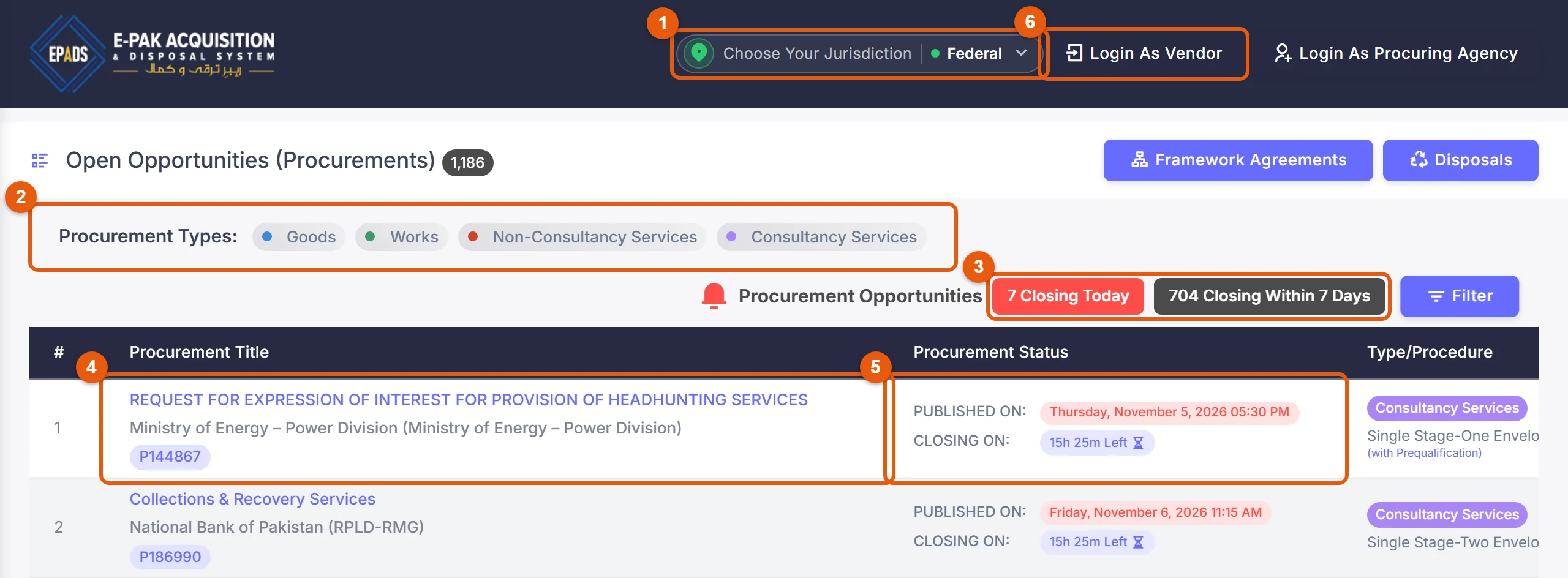
- Choose Your Jurisdiction: Federal is the default; the others are Sindh, Khyber Pakhtunkhwa, Gilgit-Baltistan and AJK.
- Procurement types: goods, works, non-consultancy services and consultancy services.
- Tenders closing today and within 7 days.
- The tender's title, the procuring agency and its e-PADS reference (P144867 here). The title opens the tender's page.
- When it was published and when it closes, or the time left.
- Login As Vendor, the bidders' login. Login As Procuring Agency is for government staff.
Screenshot of epads.gov.pk, run by PPRA, taken 18 November 2026. Numbered marks added by PakistanTenders.pk.
A tender's title opens its page, with the notice itself, its documents and the way into the vendor portal to bid:
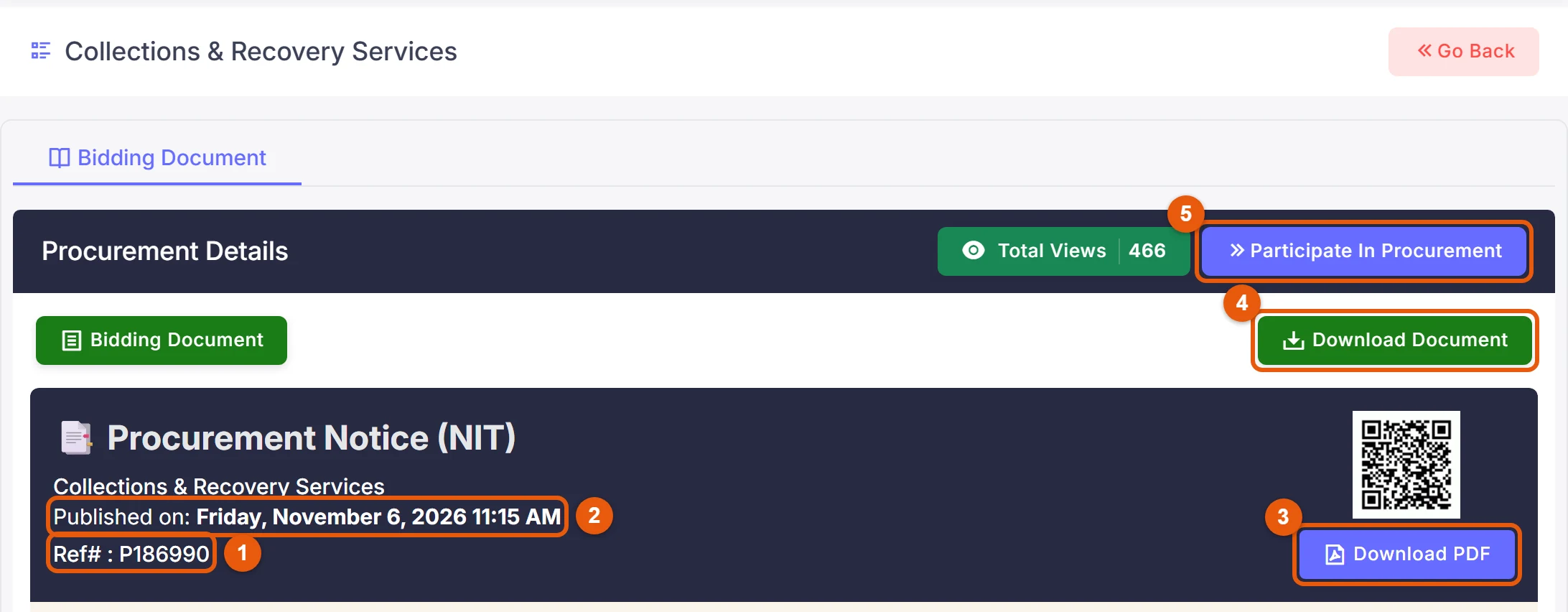
- The e-PADS reference (Ref# P186990).
- When the notice was published.
- Download PDF: the notice as a PDF.
- Download Document: the bidding document as a PDF. On this tender it downloaded without logging in.
- Participate In Procurement opens the tender on the vendor portal, which asks you to log in.
Screenshot of a tender's page on epads.gov.pk, taken 18 November 2026. Numbered marks added by PakistanTenders.pk.
Large tenders are also printed in newspapers: under the 2026 rules, procurements over Rs 5 million must be advertised in two national dailies as well. The federal e-PADS tenders page here lists those printed notices with their clippings, and the notice usually gives the e-PADS reference to search for.
Submit a bid
- Download the bidding documents from the tender's page on e-PADS. On the tender we checked on 18 November 2026, "Download Document" gave the bidding document as a PDF without logging in, and "Participate In Procurement" led to the vendor login.
- Prepare the bid as the documents require: bid form, price schedule, eligibility documents and the bid security or bid-securing declaration.
- Upload and submit before the closing time. The federal bidding documents we read say all bids are submitted through e-PADS v2.0 and manual bids are not accepted.
- Bid security: upload a scanned copy with the bid, and deliver the original instrument (call deposit, pay order or bank guarantee) to the procuring agency before the deadline. SSGC, for example, asks for the physical bid bond in its tender room. See the bid security guide.
- Bids are opened on e-PADS, usually soon after closing; under Rule 40 of the 2026 rules, at least 30 minutes after the deadline, with the minutes generated on e-PADS.
The e-PADS terms ask for bids to stay valid for at least 90 days unless the tender says otherwise.
Results and complaints
Rule 10 of the 2026 rules requires agencies to communicate the outcome to bidders through e-PADS, and the final evaluation report is published on e-PADS and on PPRA's and the agency's websites before the contract is awarded. A bidder who disagrees can complain to the agency's grievance redressal committee, and appeal to PPRA. The tender result guide sets out where to look and the deadlines.
Help and training
- e-PADS helpline: 051-111-137-237 (+92 51 111 137 237)
- E-mail: epadshelp@ppra.gov.pk
- Office: Office 201 B, 2nd Floor, Evacuee Trust Complex, F-5/1, Islamabad
- Videos: PPRA's training videos and the e-PADS 2.0 YouTube channel
- Free vendor training: online courses on registration and bid preparation, listed at ppra.gov.pk/trainings
Questions bidders ask
Is this the e-PADS website?
No. PakistanTenders.pk is an independent site that lists tender notices printed in newspapers. e-PADS is at epads.gov.pk, and vendors log in at vendors.epads.gov.pk.
What is the e-PADS login address?
Bidders and suppliers log in at vendors.epads.gov.pk/login. The login at pa.epads.gov.pk is for procuring agencies' staff and has no sign-up.
I had an account on the old e-PADS. Do I need to register again?
Federal bidding documents now ask bidders to be registered on e-PADS v2.0, and SSGC advises all bidders to register on 2.0. If you have only a version 1 account (eprocure.gov.pk), register on vendors.epads.gov.pk.
Is e-PADS registration free?
PPRA publishes no vendor registration fee. The Rs 15,000 fees in PPRA's 2024 notification are paid by procuring agencies for uploading tenders and evaluation reports, not by bidders. The portal's own terms are the authority if that changes.
Can I submit a paper bid instead?
Not for a tender run on e-PADS: the federal bidding documents we read say all bids are submitted through e-PADS v2.0 and manual bids are not accepted. The original bid security is the exception; it is delivered to the procuring agency, with a scanned copy uploaded with the bid.
What is the difference between e-PADS and EPMS?
e-PADS is where tenders are run and bids submitted. EPMS (epms.ppra.gov.pk) is PPRA's platform for publishing procurement advertisements and evaluation reports. PPRA has said that using e-PADS is no substitute for EPMS, so agencies publish on both.
What is the e-PADS helpline number?
051-111-137-237 (from abroad +92 51 111 137 237), e-mail epadshelp@ppra.gov.pk.
Is Punjab on e-PADS?
Punjab's departments use the Punjab e-Procurement System at ep.punjab.gov.pk, which PPRA Punjab's website links as the province's system. The notices on our Punjab e-Procurement page send bidders there.
Sources
Checked on 18 Nov 2026. The rules and the portals themselves are the authority; where a rule changes after that date, the change applies.
- e-PADS: open opportunities and jurisdictions (epads.gov.pk)
- e-PADS v2.0 vendor portal: login and registration form (vendors.epads.gov.pk)
- e-PADS terms and conditions
- PPRA announcements (EPADS 2.0 go-live, registration video, EPMS)
- PPRA contact page (e-PADS helpline and office)
- Public Procurement Rules, 2026 (SRO 1658(I)/2026), Rules 2, 3, 8 and 10
- PPRA regulatory fee notification and letter on EPMS
- PPRA Punjab: Punjab e-Procurement System
- PIDCL standard bidding document on e-PADS v2.0 (bid submission and opening)
- SSGC tenders page (EPADS 2.0 registration, physical bid bond)
- APP, 2 July 2026: PPRA on EPADS 2.0 features and roll-out
PakistanTenders.pk is an independent site, not a government body or regulator. Spotted a mistake? Tell us.
